- Home Page /
- Office Products /
- Office Electronics /
- Point-of-Sale (POS) Equipment /
- Receipt Printers /
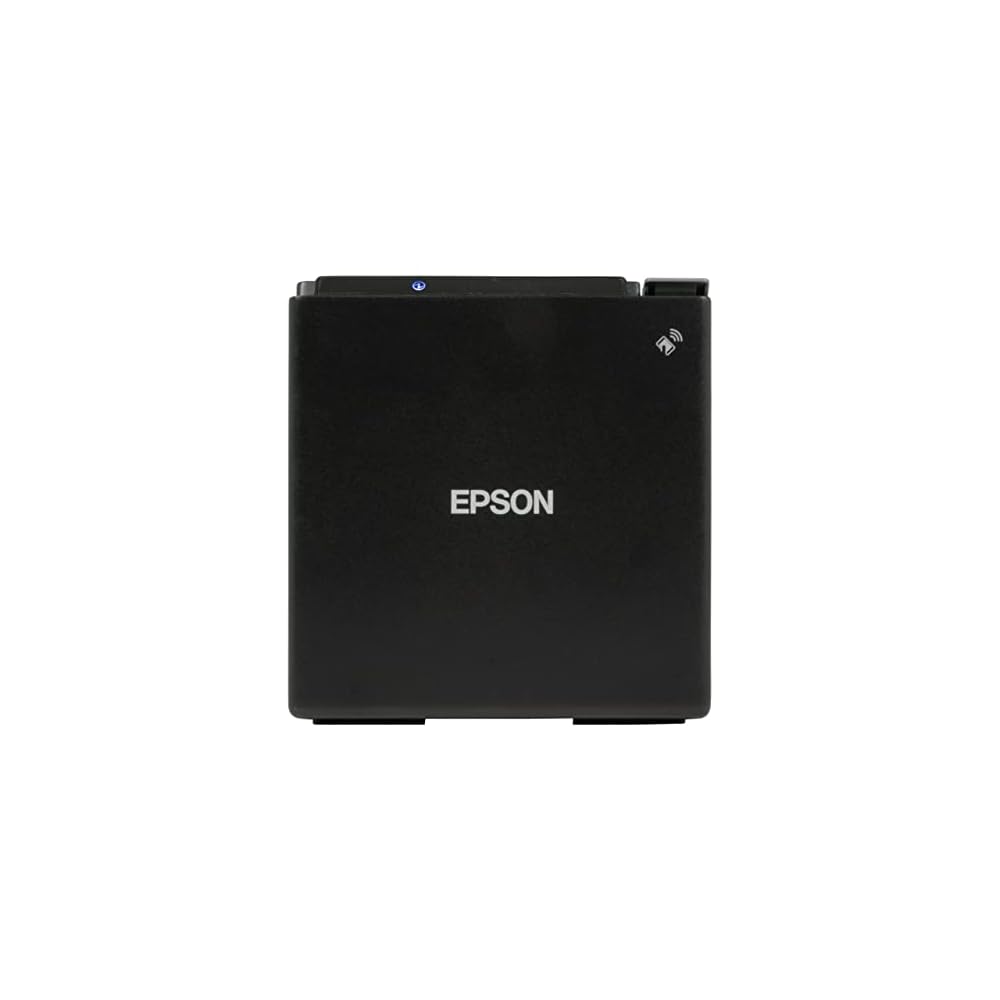
- Epson TM-M30II Thermal Wireless Dongle Requir...
0 ratings





Item #:
66759725
Epson TM-M30II Thermal Wireless Dongle Required POS Receipt Printer - Bluetooth and Ethernet Connectivity - Thermal line Printing Technology, 250
Item #:
66759725
XAF 194994
Price Details
Excluding Shipping & Custom charges ( Shipping and custom charges will be calculated on checkout )
*All items will import from US
24%
0 ratings
Write a review
In stock
 Imported from USA store
QTY:
Only 16 items left in stock.
Order now and get it around Monday, July 13
Secured transaction
Ubuy works hard to protect your security and privacy. Our advanced payment security system ensures confidentiality by encrypting your information during transmission using AES (Advanced Encryption Standards) and SSL (Secure Socket Layer) protocols. Your payment details are 100% secure as we do not share your payment details with third party sellers.
Our Top Logistics Partners


Max printing speed of 590.6 inches per minute - for fast and efficient printing

Fast
Shipping

Free
Return*

Secure Packaging

100% Original Products

PCI DSS Compliance

ISO 27001 Certified


Note: Step Down Voltage Transformer required for using electronics products of US store (110-120). Recommended power converters Buy Now.


What Stands Out
Fast Printing Speed
Achieve swift transactions with a remarkable print speed of 250 mm/sec, minimizing wait times and enhancing customer satisfaction at busy points of sale.
Versatile Connectivity
Enjoy seamless integration with Bluetooth and Ethernet options, allowing flexible placement and easy connections to various devices, enhancing the setup experience.
Reliable Thermal Technology
Benefit from high-quality thermal line printing at 203 dpi, ensuring crisp and clear receipts, while the auto-cutter feature offers convenience for efficient receipt handling.
Product Details
| Printer Type | Thermal |
| Other Special Features of the Product | Thermal |
| Printer Output Type | Monochrome |
| Item Weight | 2.87 Pounds (1.3 kg) |
| Item Dimensions D x W x H | 7"D x 5"W x 5"H (17.8 x 12.7 x 12.7 cm) |
| Controller Type | Android |
| Print media | Thermal Paper |
| Maximum Copy Speed Black and White | 70 ppm |
| Compatible Devices | Laptops, PC, POS |
| Ink Color | Black |
| Additional Printer Functions | Print Only |
| Control Method | App |
| Number of Trays | 1 |
| Processor Count | 1 |
| Resolution | 203 x 203 DPI |
| Maximum Media Size | 3.13 inches (8 cm) |
| Maximum Sheet Capacity | 100 |
| Paper Size | 3.13 inches (8 cm) |
| Maximum Print Resolution Black and White | 203 dpi |
| Power Consumption | 32.4 Watts |
| Wattage | 32.4 watts |
| Dual-sided printing | No |
| Duplex | auto |
| Brand | Epson |
| Model Name | TM-M30II |
| Model Number | M30II |
| Built-In Media | 1 thermal roll paper, Power switch cover, Roll paper guide |
| Model Series | M30II |
| Specific Uses For Product | Retail, Hospitality, Point-of-Sale Systems, Commercial Environments |
| UPC | 010343923584 |
| Manufacturer | Epson |
| Unit Count | 1.0 Count |
| Color Pages per Minute | 1 ppm |
| B&W Pages per Minute | 1 ppm |
| Color | Black |
| Color Depth | 1 bpp |
| Printer Connectivity Type | USB |
| Hardware Interface | Ethernet, USB, USB 2.0 |
| Number of Ethernet Ports | 1 |
| Total Usb Ports | 1 |
| Maximum Copy Resolution Black and White | 203 dpi |
| Connectivity Technology | USB |
| Printing Technology | Thermal |
| Special Feature | Thermal |
| Printer Output | Monochrome |
| Maximum Print Speed (Color) | 1 ppm |
| Max Printspeed Monochrome | 1 ppm |
Who Should Buy?

-
Retail Environments
Ideal for retail stores needing quick and reliable receipt printing for transactions, enhancing customer experiences.
-
Restaurants & Cafes
Perfect for dining establishments that require fast receipt printing to keep service flowing smoothly.
-
Mobile Businesses
Great for mobile vendors or services needing a compact and wireless solution for printing receipts on-the-go.

-
High-Volume Printing
Not suitable for businesses with extremely high transaction volumes due to potential demands outpacing the printer’s specifications.
-
Color Printing Needs
Does not support color printing, limiting its use for businesses that require multi-color receipt designs.
-
Budget Constraints
May not be ideal for users looking for a highly cost-effective solution, as additional accessories might be needed.
Product Description
Have any Query? Chat with us
Customer Questions & Answers
-
Question:
What are the connectivity options for the Epson TM-M30II printer?
Answer: The Epson TM-M30II offers versatile connectivity options including Bluetooth and Ethernet. This allows users to connect wirelessly or through a wired network, making it suitable for various POS systems. Bluetooth connectivity is particularly beneficial in mobile environments like cafes or restaurants, where table-side service is common. Ethernet is ideal for fixed installations in retail setups, ensuring stable and robust connections. -
Question:
What kind of printing technology does the Epson TM-M30II use?
Answer: The Epson TM-M30II utilizes thermal line printing technology. This method leverages heat to produce high-quality receipts without the need for ink or toner, which makes it cost-effective and low maintenance. Thermal printing is renowned for its speed, which is essential in busy environments like retail and hospitality where quick service can enhance customer satisfaction. -
Question:
Is the Epson TM-M30II compatible with all POS systems?
Answer: Yes, the Epson TM-M30II is designed to be compatible with a variety of POS systems. Its flexible connectivity options and support for multiple interface types ensure that it can work seamlessly with both traditional and modern POS setups. This versatility makes it an excellent choice for businesses looking to upgrade their receipt printing solutions. -
Question:
Can I print logos and graphics using the Epson TM-M30II?
Answer: Absolutely! The Epson TM-M30II supports printing logos and graphics on receipts. This feature can be leveraged for branding purposes, allowing businesses to include company logos, promotional messages, or even barcodes directly on the receipt. This capability enhances the customer experience while reinforcing brand identity during transactions. -
Question:
What is the maximum print speed of the Epson TM-M30II?
Answer: The Epson TM-M30II boasts an impressive print speed of up to 250mm per second. This high-speed printing is essential in fast-paced environments such as restaurants or retail stores where minimizing customer wait times is crucial. Such efficiency not only improves service quality but also contributes to overall productivity. -
Question:
What media types can the Epson TM-M30II support?
Answer: The Epson TM-M30II supports a range of media types, primarily thermal paper rolls. Typically, it can handle paper widths of 80mm and 58mm, which makes it adaptable for various business needs. This flexibility allows businesses to choose the type of receipt paper that best suits their operations, whether for a small boutique or a high-volume restaurant. -
Question:
Is installation difficult for the Epson TM-M30II?
Answer: The installation of the Epson TM-M30II is designed to be user-friendly. With detailed instructions provided in the manual and straightforward connectivity options, most users can set it up without technical expertise. It’s suitable for various setups, making it ideal for different retail and hospitality environments, from small cafes to larger retail chains. -
Question:
Does the Epson TM-M30II support mobile printing?
Answer: Yes, the Epson TM-M30II supports mobile printing through its Bluetooth connectivity. This feature allows businesses to print receipts directly from tablets or smartphones, making it perfect for businesses that offer table-side service or attend events. Mobile printing not only enhances convenience but also improves customer engagement and satisfaction. -
Question:
What are the dimensions and weight of the Epson TM-M30II?
Answer: The Epson TM-M30II is compact and lightweight, measuring approximately 8.3 inches in width and 5.3 inches in depth, with a height of about 3.1 inches. Weighing just around 1.8 kg, it’s easy to fit into small spaces or move between locations. This design makes it an excellent choice for businesses with limited counter space or those requiring portability. -
Question:
Where can I buy the Epson TM-M30II Thermal Wireless Receipt Printer?
Answer: You can buy the Epson TM-M30II Thermal Wireless Receipt Printer from Ubuy. They offer a reliable platform to find this printer along with various accessories, ensuring you have everything you need for your POS setup. Ubuy frequently updates their stock, providing you access to the latest model with optimal features.
Epson Receipt Printers M30II Editorial Review
No editorial reviews found
Customer Reviews & Ratings
43 customers ratings
-
5 Star
43%
-
4 Star
12%
-
3 Star
11%
-
2 Star
4%
-
1 Star
30%
Review this product
Share your thoughts with other customers
Pros
- Compact design saves space
- Bluetooth and Ethernet connectivity
- Fast thermal printing speeds
- Reliable for basic printing needs
Cons
- Wireless dongle required
Related Categories
Related Brands
Product Price History
Important information
- Limitations : For products shipped internationally, please note that any manufacturer warranty may not be valid; manufacturer service options may not be available; product manuals, instructions, and safety warnings may not be in destination country languages; the products (and accompanying materials) may not be designed in accordance with destination country standards, specifications, and labeling requirements; and the products may not conform to destination country voltage and other electrical standards (requiring use of an adapter or converter if appropriate). The recipient is responsible for assuring that the product can be lawfully imported to the destination country. When ordering from Ubuy or its affiliates, the recipient is the importer of record and must comply with all laws and regulations of the destination country.
- Not all the products listed on Ubuy are for sale, as Ubuy is a global search engine. Products are subject to export/trade regulations.
XAF 194994
Order now and get it around Monday, July 13
This item is not restrict in my country.(Please click on above link if this item is not restrict in your country, So our team will review and allow.)
QTY:
Only 16 items left in stock.
Secured transaction
Ubuy works hard to protect your security and privacy. Our advanced payment security system ensures confidentiality by encrypting your information during transmission using AES (Advanced Encryption Standards) and SSL (Secure Socket Layer) protocols. Your payment details are 100% secure as we do not share your payment details with third party sellers.
Our Top Logistics Partners
Fastest cross-border delivery
Features & Benefits
- Printer
- Thermal line
- Monochrome
- 203 dpi
- Wired, Wireless